Redis -> Redis + Postgres Migration
This guide shows how to move a live Network Manager network from Redis-only to Redis + Postgres, including existing data.
The goal is a safe migration with clear checks at every phase.
Why Migrate?
While the Network Manager's memory footprint remains small, Redis is a poor way to store large amount of data. If you want to use the NetworkAPI database features, then it'll be a good idea to migrate your network to use Postgres for data storage so you can keep your Redis cache small.
What This Migration Changes
When you switch to REDIS_PLUS_SQL, Network Manager:
- Keeps Redis active for live network coordination.
- Mirrors writes into SQL for durability.
- Lets you backfill old Redis data into SQL.
- Lets you verify parity between Redis and SQL.
So this is not an instant hard cutover. It is a staged migration.
Important
Built-in system namespaces are still seeded as REDIS_ONLY and system-managed.
You still get SQL copies for durability/migration workflows.
SQL-authoritative cutover is mainly for custom owner.namespace document namespaces.
Before You Start
1. Take a Maintenance Window
Do this during low traffic.
Lower churn means cleaner migration results and easier troubleshooting.
2. Confirm All Servers Run the Same Plugin Build
Do not migrate while mixed plugin versions are online.
3. Confirm Redis Is Healthy
From each server console:
If Redis is not healthy, stop and fix that first.
4. Backup
At minimum:
- Backup Redis.
- Backup
network-manager-config.jsonon all nodes. - Backup Postgres if you are reusing an existing database.
Phase 0: First-Time Postgres Setup (One Time)
If you already have a working Postgres database/user for Network Manager, skip to Phase A.
0.1 Create Database and User
Run this in Postgres as an admin role:
CREATE DATABASE nm_prod;
CREATE USER nm_user WITH PASSWORD 'replace_with_strong_password';
GRANT ALL PRIVILEGES ON DATABASE nm_prod TO nm_user;
Then:
How to decode this:
CREATE ...orGRANTmeans success.already existsusually means you already created it.permission deniedmeans your current SQL role is not privileged enough.
0.2 Remote vs Local Setup Checks
If your Postgres is remote (most production networks)
- Confirm host, port, database, user, and password.
- Confirm your server IP is allowlisted/firewall-approved.
- Confirm SSL mode (managed hosts commonly require
sslmode=require).
If your Postgres is local (Docker/same machine)
- Confirm Postgres is actually running and port is mapped.
- Use local host and disable SSL unless you explicitly configured SSL.
Example local JDBC URL:
0.3 Preflight Connection Test (Before Enabling SQL Mode)
Use DBeaver (or any SQL client) with the same credentials you will enter in Network Manager config.
Run:
SELECT current_database(), current_user;
SELECT 1;
CREATE TABLE IF NOT EXISTS public.nm_preflight_test(id int);
DROP TABLE public.nm_preflight_test;
How to decode this:
- If all queries succeed, connection and schema permissions are good.
- If
SELECT 1fails, connection details are wrong (host/port/user/pass/SSL). - If create/drop fails, your SQL user is missing schema privileges.
0.4 Table Creation Behavior
You do not manually create Network Manager tables.
When SQL mode is enabled with a valid connection, Network Manager creates required tables/indexes automatically.
0.5 Common First-Time SQL Errors
password authentication failed: wrong username/password.connection timed outorcould not connect: host/port/firewall issue.SSL is required: set JDBC URL with?sslmode=require.permission denied for schema public: missingUSAGE, CREATEon schema.
Phase A: Configure Redis + Postgres Mode
1. Collect Connection Values
Gather these values first:
- Host
- Port
- Database
- Username
- Password
- SSL mode requirement
Build JDBC URL:
For local environments:
2. Set SQL Config from Staff Network Panel
Go to:
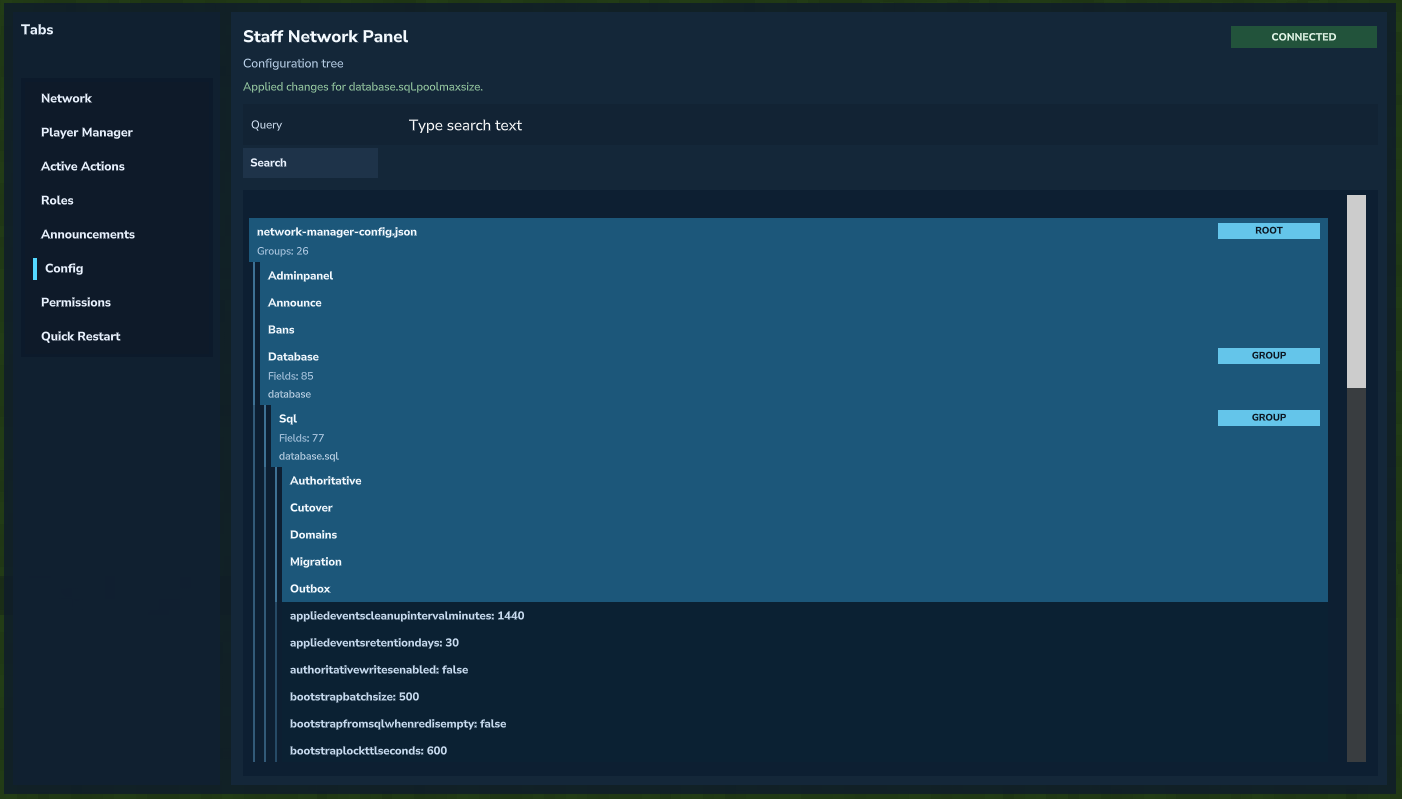 Opening SQL config fields from the Staff Network Panel.
Set these values:
| Field | Value |
|---|---|
| Database.PersistenceMode | REDIS_PLUS_SQL |
| Database.Sql.Engine | POSTGRES |
| Database.Sql.JdbcUrl | jdbc:postgresql://<HOST>:<PORT>/<DATABASE>?sslmode=require |
| Database.Sql.Username | <DB_USERNAME> |
| Database.Sql.Password | <DB_PASSWORD> |
| Database.Sql.Schema | public |
| Database.Sql.TablePrefix | nm_ |
| Database.Sql.MirrorEnabled | true |
| Database.Sql.Migration.Auto | true |
| Database.Sql.Migration.RedisWinsUnlessEmpty | true |
These only need to be set once because these fields are network-synced.
Important
JdbcUrl, Schema, and TablePrefix must match across all nodes.
MirrorEnabled must be true.
For password fields, avoid accidental leading/trailing spaces.
Controlled Rollout
If you want manual control, set Database.Sql.Migration.Auto=false, restart, and run migration commands manually.
Restart all nodes after Phase A.
Phase B: Validate Persistence Is Active
Run on your operator node:
How to decode this:
enabled=truemeans SQL layer is active.health=OK(or brieflyMIGRATING) is expected.health=DEGRADED_SQL_UNAVAILABLEmeans SQL is unreachable.dlqCountshould be0or drain back to0.- Startup failure fields should be empty.
If enabled=false, do not continue to backfill yet.
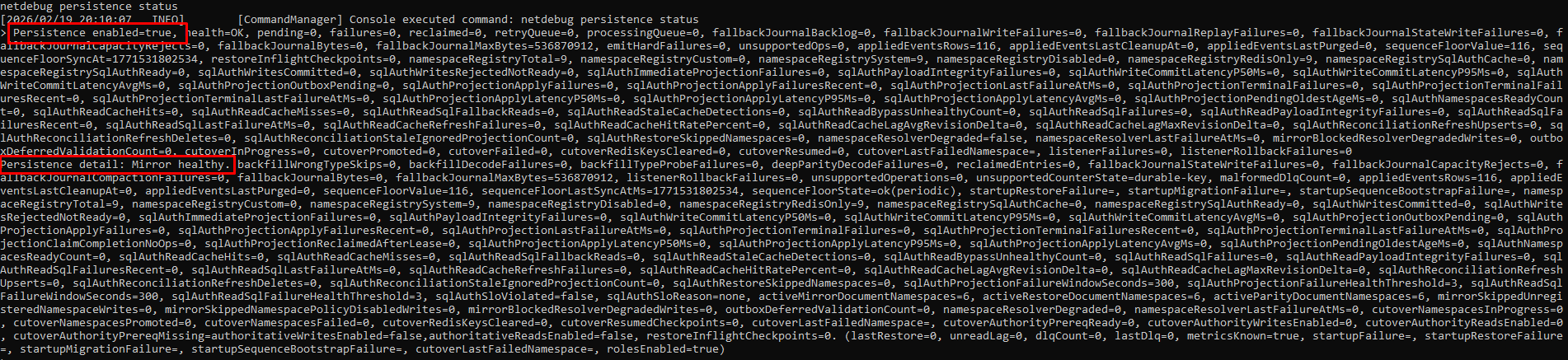 Phase B: Persistence status check output.
Phase C: Namespace Discovery
1. List registered namespaces
You should see entries like:
permissionsadminpanelbansmutesannouncementsplayersstaffchatpartynetworkmanager.persistence_registry
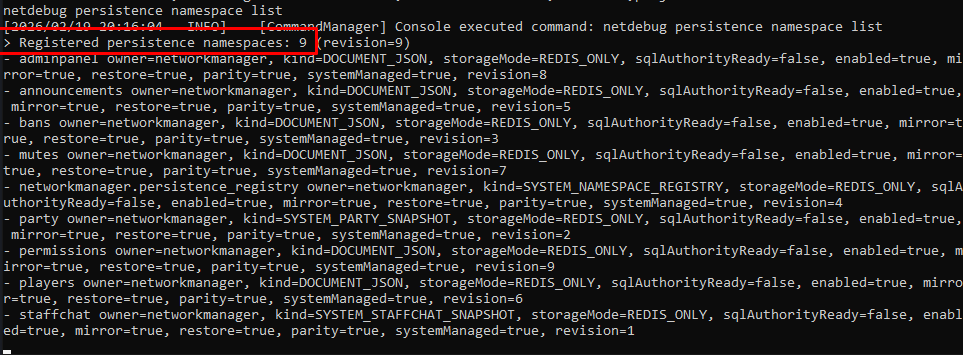 Phase C.1: Registered namespace list output.
2. Discover unknown namespaces in Redis
How to decode this:
unknownNamespaces=0means nothing hidden.unknownNamespaces>0means Redis has namespaces not in registry.
Note
During this phase, you should confirm unknownNamespaces=0 before continuing to cutover.
If you only see presence as unknown, that can come from runtime presence keys.
For strict cutover preflight, register presence so this check returns zero.
 Phase C.2: Example of the
 presence unknown namespace case.
Register custom namespaces before cutover workflows:
netdebug persistence namespace register owner=siegenet namespace=siegenet.stats enabled=true mirror=true restore=true parity=true
Note
Custom namespaces must be owner-prefixed, like owner.namespace.
 Phase C.2: Unknown namespace discovery output.
Phase D: Backfill Existing Data into SQL
When Manual Phase D May Be Optional
If Database.Sql.Migration.Auto=true, startup already runs migration automatically.
If your checks below are clean, you can skip manual Phase D and continue to Phase E/F:
netdebug persistence statusshowsenabled=true, healthy state, and nostartupMigrationFailure.- Migration state rows are completed:
netdebug persistence verify scope=all mode=deepreports parity verified.
1. Dry run
Check counters like:
documentsroleDefinitionsroleGrantswrongTypeSkipsdecodeFailures
If dry run fails, do not run real migration yet.
 Phase D.1: Migration dry run output.
2. Real migration
If Database.Sql.Migration.RedisWinsUnlessEmpty=true, SQL rows for selected scopes are cleared first, then rebuilt from Redis. This is expected.
 Phase D.2: Real migration output.
Phase E: Verify Redis vs SQL Parity
Run:
How to decode this:
Parity verifiedmeans counts/signatures line up.Parity mismatchmeans data differs somewhere in selected scopes.deepDecodeFailuresshould stay0.
If quick passes but deep fails, collect the full counter line and inspect the specific *.deep.match=0 domains before proceeding.
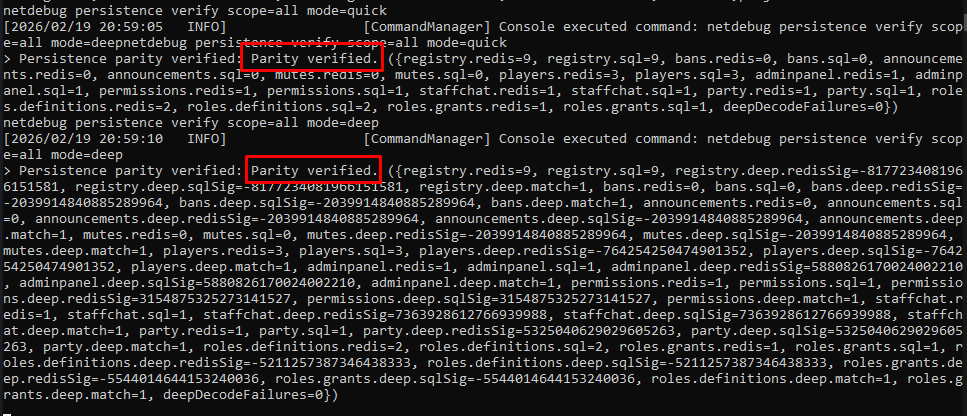 Phase E: Parity verification output.
Phase F: Operator QA Checklist
1. Runtime health check
Expected:
health=OK(or short-livedMIGRATING).dlqCount=0.- Startup failure fields blank.
- Namespace counters stable.
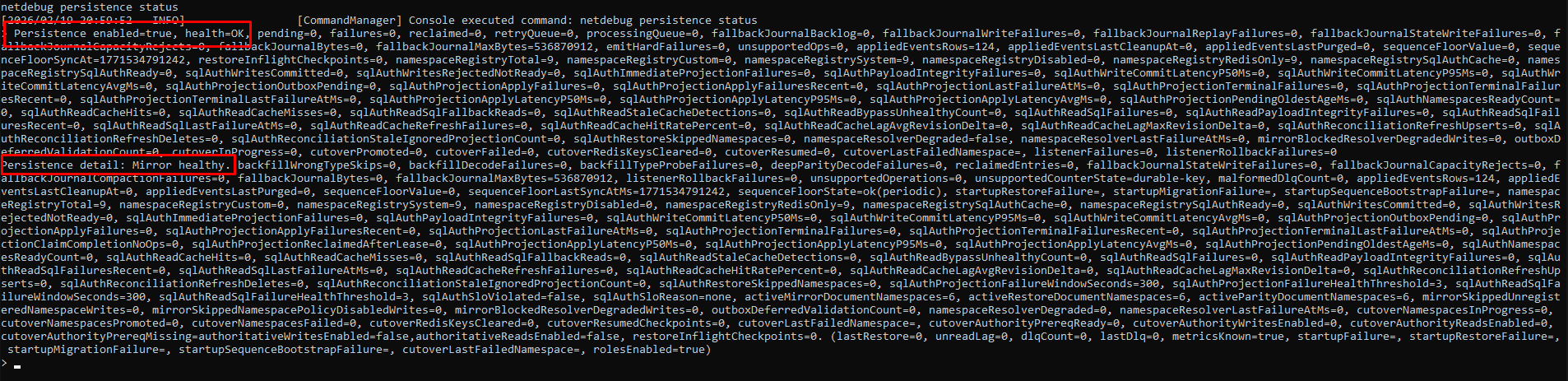 Phase F.1: Runtime health status output.
2. DBeaver table presence check
Go to:
Databases -> <your_db> -> Schemas -> public -> Tables
Confirm:
nm_documentsnm_role_definitionsnm_role_grantsnm_mirror_applied_eventsnm_migration_statenm_cache_projection_outbox
3. DBeaver data spot check
SELECT namespace, COUNT(*) AS rows
FROM public.nm_documents
WHERE deleted = false
GROUP BY namespace
ORDER BY namespace;
How to decode these:
- Active namespaces should show non-zero rows where you expect data.
- Role counts should be non-zero if you already had role data.
outbox_pendingshould usually be0(or low and draining).
Optional Phase G: SQL-Authoritative Cutover (Advanced)
Most networks can stop at Redis + SQL mirror mode.
Only use this if you intentionally want SQL as runtime authority for selected custom document namespaces.
Prereqs:
Database.Sql.Cutover.PromotionEnabled=trueDatabase.Sql.AuthoritativeWritesEnabled=trueDatabase.Sql.Authoritative.AuthoritativeReadsEnabled=trueDatabase.Sql.Authoritative.RequireReadyMarker=true
Dry run:
Real run:
Status:
Warning
System-managed namespaces are not normal SQL-authoritative cutover targets. Use this for custom document namespaces unless you explicitly know otherwise.
Rollback
If migration is unstable:
- Set
Database.PersistenceModeback toREDIS_ONLY. - Restart all nodes.
- Keep Redis as source of truth.
- Keep SQL data for backup/forensics.
Troubleshooting
SQL durability mirror is disabled
Check:
Database.PersistenceMode=REDIS_PLUS_SQLDatabase.Sql.MirrorEnabled=trueDatabase.Sql.JdbcUrlis reachable- Username/password has no accidental whitespace
Cutover preflight blocked due to unregistered Redis namespaces
Fix:
- Run namespace discovery.
- Register missing custom namespaces.
- Re-run preflight.
health=OUT_OF_SYNC
Check:
pending,unreadLag,retryQueue,processingQueuedlqCount- SQL availability
decodeFailures in migrate/verify
Meaning: one or more Redis payloads are malformed or unreadable.
Fix:
- Identify affected namespace from counters/logs.
- Repair or remove broken records.
- Re-run migrate/verify.